Would you like to help your students develop their self-regulation skills without handing over full control to the student? Discover how ‘scaffolded progress assessments’ in Portflow bridge the gap between support and independence. With this new feature, you can offer students exactly the help they need at just the right moment to draft appropriate progress review requests.
Learning how to evaluate
Portflow supports a wide range of learning processes: from predominantly programme-led to fully self-directed. The aim of many educational institutions is to teach students to become increasingly self-directed in their learning as they progress in their studies. To achieve this, the right support at the right time is crucial. A key learning moment is carrying out a progress review in Portflow, but requesting one requires the student to make a number of choices. With a number of new features in Portflow, educational institutions can decide on the right balance between support and self-direction.
What are progress reviews?
Progress reviews in Portflow are the best way to gather an overall picture of a student’s progress over a longer period. Students compile their own review requests:
- Who are they inviting?
- What are the criteria?
- What sort of feedback do they want? Quantitative and/or qualitative? If they request quantitative feedback (as well), the student chooses a rubric scale themselves.
- When will they send the request? How often do they want to review it?
There are many decisions to be made when putting together a good progress review request. Particularly at the start of their studies, students still need some support in drafting a review request.
Flexible scaffolding for review requests
The evaluators (all those invited, including the student themselves) complete the review using the provided format from their own perspective. The criteria and the rubric scale together form a rubric to provide a level indication. The results can be analysed across different roles and/or over time.
Portflow includes a number of new features that the programme learning designers can use to help students create requests. Each of these features helps students with a different challenge:
- Suggested rubric scale – Which rubric scale do you choose?
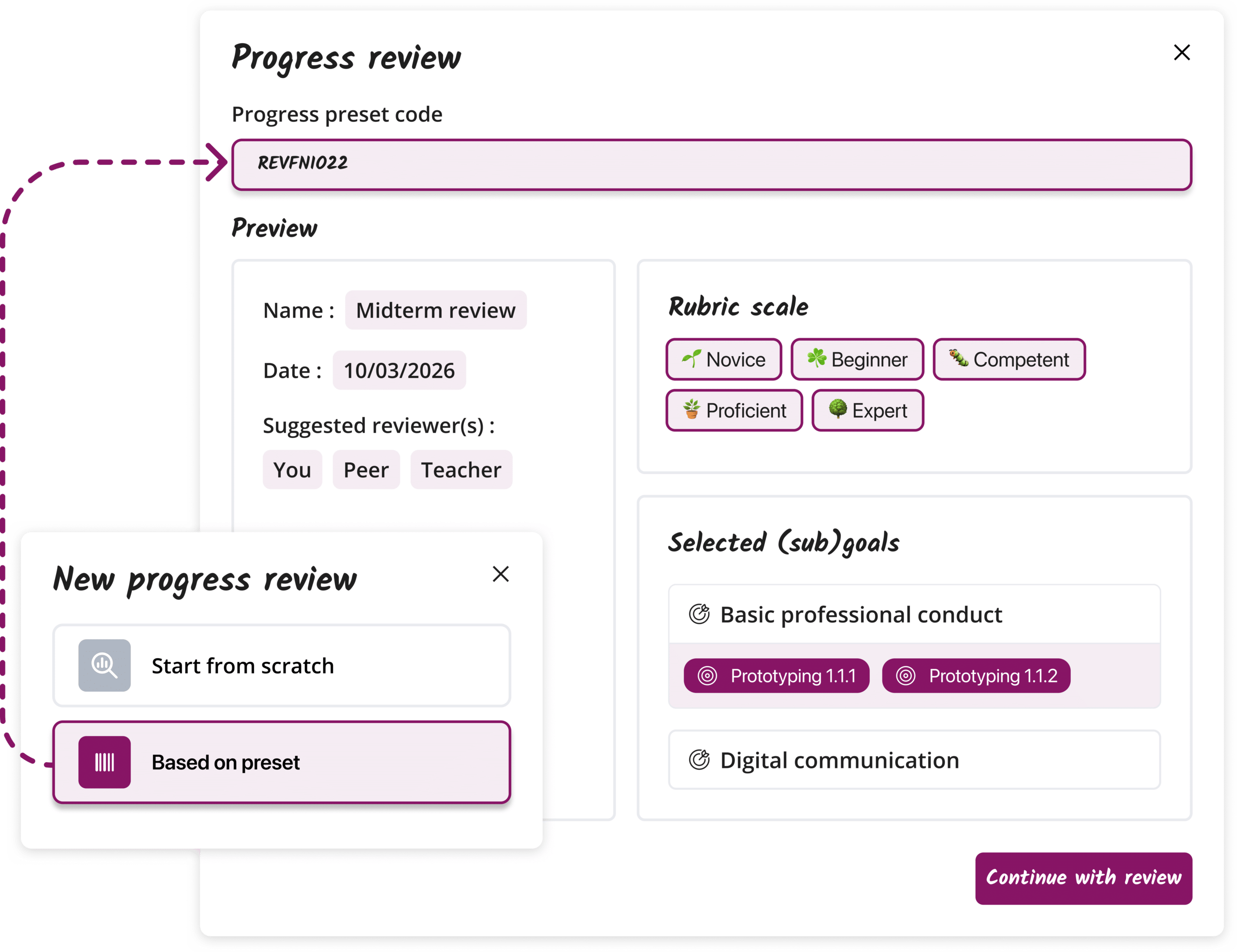
- Review preset – What choices do you make regarding the review request (criteria, quantitative/qualitative, scale, invitees)?
- Signposting review moment – When and how often do you carry out reviews?
- Rubric level descriptions – What do the levels mean for the selected criteria?
How can you scaffold progress reviews?
The new features for scaffolding progress reviews can be used in combination, depending on the student’s support needs at that particular time. Students can accept the programme’s suggestions or decide to make different choices.
Suggested rubric scale
One or more relevant rubric scales are selected as an attachment to a learning objective. When the student selects this objective as a criterion, the suggested rubric scale appears at the top of the list.
Power users can link rubric scales to goals in the goal repository.
Review preset
Prepare a review request that the student can import at a time of their choosing to create their own review request. This preset can include all the options for the request, or a selection of options. Intensity of scaffolding can be tailored precisely to the current situation.
A review preset can be created by power users in ‘Scaffolds’. Students can import it using the code as soon as they start creating a new review request.
Signposting review moment
The programme/teacher can send students a notification containing the review preset, thereby providing students with both the settings and the timing of the review request.
Power users can send the notification from the relevant review preset. Students can start the request straight away and, if they wish, add further details.
Rubric level descriptions
The programme can provide further information on what a particular rubric level entails for a specific criterion (goal). This is useful both when composing the request and when completing the review. This gives reviewers guidance on how to interpret the criteria.
Power users can link level descriptions in the goal repository. Reviewers can see the descriptions immediately when they start reviewing.

Co-creation
These new features have been developed in collaboration with our educational partners, such as Fontys, HvA and ECU. Thanks to fruitful discussions and an iterative approach, we have jointly identified the key practical needs of users involved in teaching self-regulated learning behaviours. This has enabled Portflow’s product team to develop this combination of features, which allows you to offer tailored support to students.
Want to find out more?
Ready to help students assess more effectively? Take a look at our knowledge base articles on review presets, suggesting rubric scales, rubric level descriptions and signposting progress reviews.

About the Author: Pieter J. Smits